
CEO & Co-founder of Visivo
Building Python Data Pipelines for Visivo Dashboards
A Python script prints CSV, a Visivo seed loads it, and the dashboard is YAML in Git. How to build, test, ship, and monitor that pipeline.

Python does the data processing. Visivo turns the result into a dashboard defined in YAML. The handoff between them is small: a script prints CSV, and a Visivo seed loads it into a table before any model queries it. This guide covers that handoff and everything around it in production: tests, containers, CI, forecasting, and monitoring.
Two numbers frame why the production part matters. Grand View Research projects that "The global data analytics market will reach $684.12 billion by 2030," driven largely by automated data processing capabilities. VentureBeat reports that "87% of data science projects never make it to production," often due to lack of proper pipeline infrastructure. A pipeline that is version-controlled and testable from the first commit is how you stay out of that 87%.
How a seed connects Python to a dashboard
A seed runs a command, reads the CSV it prints to stdout, and loads it into a table on a source before any model queries it. The processing logic stays in Python and the visualization configuration stays in YAML, which is the same separation the modern data stack already favors.
The core pattern
# scripts/generate_sales_data.py
import pandas as pd
import psycopg2
from datetime import datetime, timedelta
import json

def extract_sales_data():
    """Extract raw sales data from multiple sources"""
    # API data extraction
    api_data = fetch_from_crm_api()

    # Database extraction
    db_data = fetch_from_transactional_db()

    # File processing
    file_data = process_uploaded_files()

    return combine_data_sources(api_data, db_data, file_data)

def transform_for_analytics(raw_data):
    """Apply business logic and aggregations"""
    df = pd.DataFrame(raw_data)

    # Clean and standardize
    df['sale_date'] = pd.to_datetime(df['sale_date'])
    df['revenue'] = df['quantity'] * df['unit_price']

    # Calculate business metrics
    daily_summary = df.groupby(['sale_date', 'region']).agg({
        'revenue': 'sum',
        'quantity': 'sum',
        'order_id': 'nunique'
    }).reset_index()

    daily_summary.columns = ['date', 'region', 'total_revenue',
                           'total_quantity', 'order_count']

    return daily_summary

def output_for_visivo(processed_data):
    """Format data for Visivo consumption"""
    # Output as CSV for Visivo model consumption
    print(processed_data.to_csv(index=False))

if __name__ == "__main__":
    raw_data = extract_sales_data()
    processed_data = transform_for_analytics(raw_data)
    output_for_visivo(processed_data)
The script prints CSV. A seed on a DuckDB source loads it:
# project.visivo.yml
name: model_example

sources:
  - name: local
    type: duckdb
    database: target/local.duckdb
    seeds:
      - table_name: sales_data
        existing_table: overwrite
        args:
          - python
          - scripts/generate_sales_data.py

models:
  - name: daily_sales_metrics
    source: ${ref(local)}
    sql: SELECT * FROM sales_data
existing_table: overwrite reruns the script on every visivo run and replaces the table. The default, skip, leaves an existing table in place and does not run the command again.
Pipeline patterns
Multi-source integration
Most analytics combines data from several systems. Python does the orchestration (async API calls, a SQL query, a few CSV files) and prints one unified table, which lands in DuckDB like any other seed:
# scripts/multi_source_pipeline.py
import asyncio
import aiohttp
import pandas as pd
from sqlalchemy import create_engine
import requests
from datetime import datetime, timedelta

class MultiSourcePipeline:
    def __init__(self, config):
        self.config = config
        self.db_engine = create_engine(config['database_url'])

    async def fetch_api_data(self, session, endpoint):
        """Async API data fetching"""
        headers = {'Authorization': f"Bearer {self.config['api_token']}"}
        async with session.get(endpoint, headers=headers) as response:
            return await response.json()

    def fetch_database_metrics(self):
        """Extract from operational database"""
        query = """
        SELECT
            DATE(created_at) as metric_date,
            product_category,
            COUNT(*) as transaction_count,
            SUM(amount) as total_amount
        FROM transactions
        WHERE created_at >= CURRENT_DATE - INTERVAL '30 days'
        GROUP BY DATE(created_at), product_category
        ORDER BY metric_date DESC
        """
        return pd.read_sql(query, self.db_engine)

    def process_csv_uploads(self):
        """Handle manual CSV data uploads"""
        csv_files = ['data/external_metrics.csv', 'data/partner_data.csv']
        combined_df = pd.concat([
            pd.read_csv(file) for file in csv_files if os.path.exists(file)
        ])
        return combined_df

    async def run_pipeline(self):
        """Orchestrate the complete data pipeline"""
        # Parallel API calls
        async with aiohttp.ClientSession() as session:
            api_tasks = [
                self.fetch_api_data(session, 'https://api.stripe.com/charges'),
                self.fetch_api_data(session, 'https://api.hubspot.com/contacts'),
                self.fetch_api_data(session, 'https://api.salesforce.com/leads')
            ]
            api_results = await asyncio.gather(*api_tasks)

        # Database extraction
        db_metrics = self.fetch_database_metrics()

        # File processing
        csv_data = self.process_csv_uploads()

        # Combine and transform
        unified_data = self.merge_all_sources(api_results, db_metrics, csv_data)

        # Output for Visivo
        return self.format_for_dashboard(unified_data)

    def merge_all_sources(self, api_data, db_data, csv_data):
        """Combine data from all sources into unified schema"""
        # Normalize API data
        stripe_df = pd.json_normalize(api_data[0]['data'])
        hubspot_df = pd.json_normalize(api_data[1]['results'])

        # Apply business logic to unify schemas
        unified_df = self.apply_business_rules(stripe_df, hubspot_df, db_data, csv_data)

        return unified_df

    def format_for_dashboard(self, data):
        """Final formatting for Visivo consumption"""
        # Calculate KPIs and metrics for dashboard
        dashboard_ready = data.groupby(['date', 'source']).agg({
            'revenue': 'sum',
            'customer_count': 'nunique',
            'conversion_rate': 'mean'
        }).reset_index()

        print(dashboard_ready.to_csv(index=False))

# Entry point for Visivo
if __name__ == "__main__":
    config = {
        'database_url': os.environ['DATABASE_URL'],
        'api_token': os.environ['API_TOKEN']
    }

    pipeline = MultiSourcePipeline(config)
    asyncio.run(pipeline.run_pipeline())
The Visivo side stays short, because the complexity lives in the script:
name: dashboard_example

sources:
  - name: local
    type: duckdb
    database: target/local.duckdb
    seeds:
      - table_name: business_data
        existing_table: overwrite
        args:
          - python
          - scripts/multi_source_pipeline.py

models:
  - name: unified_business_metrics
    source: ${ref(local)}
    sql: SELECT * FROM business_data

insights:
  - name: revenue_trend
    props:
      type: scatter
      mode: lines+markers
      x: ?{ ${ref(unified_business_metrics).date} }
      y: ?{ ${ref(unified_business_metrics).revenue} }
    interactions:
      - split: ?{ ${ref(unified_business_metrics).source} }

charts:
  - name: unified_metrics_dashboard
    insights:
      - ${ref(revenue_trend)}
    layout:
      title:
        text: "Multi-Source Revenue Analysis"
      xaxis:
        title:
          text: "Date"
      yaxis:
        title:
          text: "Revenue ($)"
        tickformat: "$,.0f"
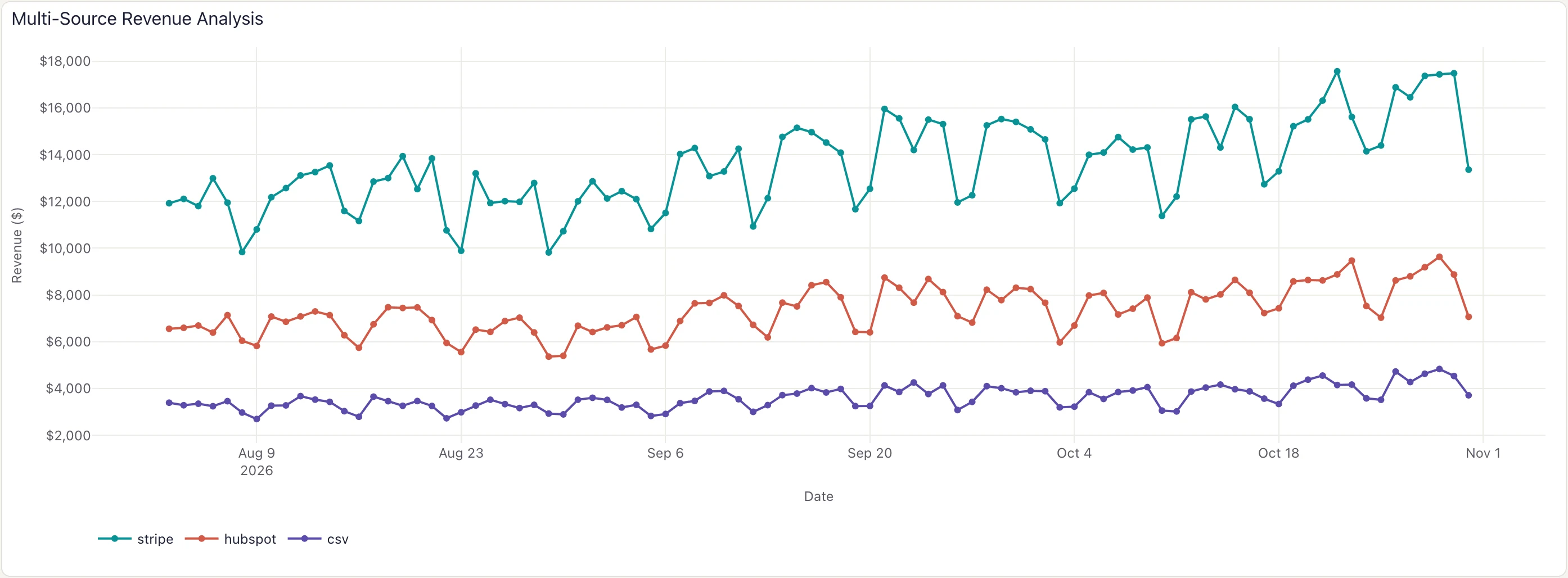 Multi-Source Revenue Analysis: one Insight split by source over data that a Python seed writes into DuckDB.
Near real-time processing
For near real-time analytics, a long-running Python process aggregates events into a file, and Visivo reads that file on each run:
# scripts/streaming_processor.py
import pandas as pd
import redis
from datetime import datetime
import json
import time

class StreamingProcessor:
    def __init__(self):
        self.redis_client = redis.Redis(host='localhost', port=6379, db=0)
        self.batch_size = 1000
        self.processing_window = 60  # seconds

    def process_event_stream(self):
        """Process real-time events and aggregate for dashboard"""
        events = []
        start_time = time.time()

        while True:
            # Read from Redis stream or queue
            event = self.redis_client.blpop(['events'], timeout=1)

            if event:
                event_data = json.loads(event[1])
                events.append(event_data)

            # Process batch when size or time threshold reached
            current_time = time.time()
            if (len(events) >= self.batch_size or
                current_time - start_time >= self.processing_window):

                if events:
                    self.process_event_batch(events)
                    events = []
                    start_time = current_time

    def process_event_batch(self, events):
        """Transform event batch into dashboard metrics"""
        df = pd.DataFrame(events)

        # Real-time aggregations
        metrics = df.groupby(['timestamp_hour', 'event_type']).agg({
            'user_id': 'nunique',
            'revenue': 'sum',
            'conversion': 'mean'
        }).reset_index()

        # Update dashboard data
        self.update_dashboard_data(metrics)

    def update_dashboard_data(self, metrics):
        """Write processed metrics for Visivo consumption"""
        # Append to existing data or overwrite
        output_file = 'data/realtime_metrics.csv'

        if os.path.exists(output_file):
            existing = pd.read_csv(output_file)
            combined = pd.concat([existing, metrics]).drop_duplicates()
        else:
            combined = metrics

        combined.to_csv(output_file, index=False)

if __name__ == "__main__":
    processor = StreamingProcessor()
    processor.process_event_stream()
Load the file with a seed. With existing_table: overwrite, each visivo run reloads it and picks up the latest batch:
name: insight_example

sources:
  - name: local
    type: duckdb
    database: target/local.duckdb
    seeds:
      - table_name: live_data
        existing_table: overwrite
        args:
          - cat
          - data/realtime_metrics.csv

models:
  - name: realtime_metrics
    source: ${ref(local)}
    sql: SELECT * FROM live_data

insights:
  - name: live_conversions
    props:
      type: scatter
      mode: lines
      x: ?{ ${ref(realtime_metrics).timestamp_hour} }
      y: ?{ ${ref(realtime_metrics).conversion} }
    interactions:
      - split: ?{ ${ref(realtime_metrics).event_type} }
Testing the pipeline and the dashboard
pytest covers the pipeline code. visivo test covers the values your Insights compute from its output:
Pipeline tests in pytest
# tests/test_pipeline_quality.py
import io
import subprocess

import pytest
import pandas as pd
from scripts.generate_sales_data import transform_for_analytics


def get_pipeline_output():
    """Run the script the seed runs and parse the CSV it prints"""
    result = subprocess.run(
        ["python", "scripts/generate_sales_data.py"],
        capture_output=True, text=True, check=True
    )
    return pd.read_csv(io.StringIO(result.stdout))

class TestDataPipeline:
    def test_data_completeness(self):
        """Ensure pipeline produces complete data"""
        # Test the Python pipeline directly
        sample_data = self.create_sample_data()
        result = transform_for_analytics(sample_data)

        # Verify no missing critical fields
        assert not result['date'].isna().any()
        assert not result['revenue'].isna().any()
        assert result['revenue'].min() >= 0

    def test_business_logic(self):
        """Verify business calculations are correct"""
        sample_data = [{
            'sale_date': '2024-01-01',
            'quantity': 10,
            'unit_price': 50.00,
            'region': 'US'
        }]

        result = transform_for_analytics(sample_data)
        expected_revenue = 10 * 50.00

        assert result.iloc[0]['total_revenue'] == expected_revenue

    def test_seed_output(self):
        """Test the exact CSV the Visivo seed loads"""
        data = get_pipeline_output()

        # Verify data structure matches dashboard expectations
        required_columns = ['date', 'region', 'total_revenue', 'order_count']
        for col in required_columns:
            assert col in data.columns

        # Business rules validation
        assert data['total_revenue'].min() >= 0
        assert data['order_count'].min() > 0

    def test_data_freshness(self):
        """Ensure data is recent enough for business needs"""
        from datetime import datetime, timedelta

        data = get_pipeline_output()
        latest_date = pd.to_datetime(data['date']).max()
        days_old = (datetime.now() - latest_date).days

        # Data should be no more than 2 days old
        assert days_old <= 2, f"Data is {days_old} days old"

    def create_sample_data(self):
        """Create test data for pipeline testing"""
        return [
            {
                'sale_date': '2024-01-01',
                'quantity': 5,
                'unit_price': 100.00,
                'region': 'US',
                'order_id': 'ORD001'
            },
            {
                'sale_date': '2024-01-01',
                'quantity': 3,
                'unit_price': 75.00,
                'region': 'EU',
                'order_id': 'ORD002'
            }
        ]
After visivo run computes the Insights on your dashboards, visivo test asserts on the values they hold:
insights:
  - name: daily-revenue
    props:
      type: bar
      x: ?{ ${ref(daily_sales_metrics).date} }
      y: ?{ sum(${ref(daily_sales_metrics).total_revenue}) }

tests:
  - name: revenue-is-never-negative
    assertions:
      - ">{ numpy.min( ${ref(daily-revenue).props.y} ) >= 0 }"

dashboards:
  - name: Daily Sales
    rows:
      - height: medium
        items:
          - chart:
              name: daily-revenue-chart
              insights:
                - ${ref(daily-revenue)}
Validation inside the script
The script can also refuse to print anything when its own checks fail, so bad rows never reach the table:
# scripts/data_validator.py
import pandas as pd
from datetime import datetime, timedelta
import sys

class DataValidator:
    def __init__(self, data_source):
        self.data = pd.read_csv(data_source) if isinstance(data_source, str) else data_source
        self.errors = []

    def validate_schema(self, expected_columns):
        """Validate data schema matches expectations"""
        missing_cols = set(expected_columns) - set(self.data.columns)
        if missing_cols:
            self.errors.append(f"Missing columns: {missing_cols}")

    def validate_business_rules(self):
        """Apply business-specific validation rules"""
        # Revenue must be positive
        if (self.data['revenue'] < 0).any():
            self.errors.append("Found negative revenue values")

        # Dates must be reasonable
        min_date = datetime.now() - timedelta(days=365)
        max_date = datetime.now() + timedelta(days=1)

        date_col = pd.to_datetime(self.data['date'])
        if (date_col < min_date).any() or (date_col > max_date).any():
            self.errors.append("Found unreasonable dates")

    def validate_data_quality(self):
        """Check data quality metrics"""
        # Check for duplicate records
        if self.data.duplicated().any():
            self.errors.append("Found duplicate records")

        # Check for excessive nulls
        null_pct = self.data.isnull().mean()
        high_null_cols = null_pct[null_pct > 0.1].index.tolist()
        if high_null_cols:
            self.errors.append(f"High null percentage in: {high_null_cols}")

    def run_validation(self):
        """Run all validation checks"""
        expected_cols = ['date', 'region', 'revenue', 'order_count']

        self.validate_schema(expected_cols)
        self.validate_business_rules()
        self.validate_data_quality()

        if self.errors:
            print(f"VALIDATION FAILED: {len(self.errors)} errors found")
            for error in self.errors:
                print(f"  - {error}")
            sys.exit(1)
        else:
            print("Data validation passed")

        return len(self.errors) == 0

# Integration with pipeline
def validated_pipeline():
    """Pipeline with built-in validation"""
    raw_data = extract_sales_data()
    processed_data = transform_for_analytics(raw_data)

    # Validate before output
    validator = DataValidator(processed_data)
    if validator.run_validation():
        output_for_visivo(processed_data)
    else:
        sys.exit(1)

if __name__ == "__main__":
    validated_pipeline()
Production deployment
A Docker image for the pipeline
# Dockerfile
FROM python:3.11-slim

WORKDIR /app

# Install system dependencies
RUN apt-get update && apt-get install -y \
    postgresql-client \
    curl \
    && rm -rf /var/lib/apt/lists/*

# Install Python dependencies
COPY requirements.txt .
RUN pip install -r requirements.txt

# Install Visivo CLI
RUN pip install visivo

# Copy pipeline scripts
COPY scripts/ ./scripts/
COPY project.visivo.yml .
COPY .env.example .env

# Run the project (seeds run the pipeline scripts) and serve the dashboard
CMD ["sh", "-c", "visivo run && visivo serve --port 8080"]
# docker-compose.yml
version: "3.8"
services:
  analytics-pipeline:
    build: .
    ports:
      - "8080:8080"
    environment:
      - DATABASE_URL=${DATABASE_URL}
      - API_TOKEN=${API_TOKEN}
    volumes:
      - ./data:/app/data
      - ./scripts:/app/scripts
    depends_on:
      - postgres

  postgres:
    image: postgres:14
    environment:
      POSTGRES_DB: analytics
      POSTGRES_USER: analytics_user
      POSTGRES_PASSWORD: secure_password
    volumes:
      - postgres_data:/var/lib/postgresql/data

volumes:
  postgres_data:
CI/CD
# .github/workflows/analytics-pipeline.yml
name: Analytics Pipeline CI/CD

on:
  push:
    branches: [main]
  pull_request:
    branches: [main]

jobs:
  test-pipeline:
    runs-on: ubuntu-latest

    services:
      postgres:
        image: postgres:14
        env:
          POSTGRES_PASSWORD: test_password
          POSTGRES_DB: test_analytics
        options: >-
          --health-cmd pg_isready
          --health-interval 10s
          --health-timeout 5s
          --health-retries 5

    steps:
      - uses: actions/checkout@v3

      - name: Set up Python
        uses: actions/setup-python@v4
        with:
          python-version: "3.11"

      - name: Install dependencies
        run: |
          pip install -r requirements.txt
          pip install visivo

      - name: Run pipeline tests
        run: |
          pytest tests/ -v

      - name: Test Visivo compilation
        run: |
          visivo compile

      - name: Run data quality tests
        run: |
          visivo run
          visivo test

  deploy-staging:
    needs: test-pipeline
    if: github.ref == 'refs/heads/main'
    runs-on: ubuntu-latest

    steps:
      - uses: actions/checkout@v3

      - name: Deploy to staging
        env:
          VISIVO_TOKEN: ${{ secrets.VISIVO_TOKEN }}
        run: |
          # Run the project; its seeds run the pipeline scripts
          visivo run

          # Deploy to the staging stage on Visivo Cloud
          visivo deploy -s staging
Advanced analytics patterns
Time series forecasting
# scripts/forecasting_pipeline.py
import pandas as pd
import numpy as np
from sklearn.ensemble import RandomForestRegressor
from sklearn.metrics import mean_absolute_error
import joblib
from datetime import datetime, timedelta

class ForecastingPipeline:
    def __init__(self):
        self.model = RandomForestRegressor(n_estimators=100, random_state=42)
        self.feature_columns = ['day_of_week', 'month', 'is_weekend', 'lag_7', 'lag_30']

    def create_features(self, df):
        """Engineer features for forecasting"""
        df['date'] = pd.to_datetime(df['date'])
        df = df.sort_values('date')

        # Time-based features
        df['day_of_week'] = df['date'].dt.dayofweek
        df['month'] = df['date'].dt.month
        df['is_weekend'] = (df['day_of_week'] >= 5).astype(int)

        # Lag features
        df['lag_7'] = df['revenue'].shift(7)
        df['lag_30'] = df['revenue'].shift(30)

        # Rolling averages
        df['ma_7'] = df['revenue'].rolling(window=7).mean()
        df['ma_30'] = df['revenue'].rolling(window=30).mean()

        return df.dropna()

    def train_model(self, historical_data):
        """Train forecasting model on historical data"""
        df = self.create_features(historical_data)

        X = df[self.feature_columns]
        y = df['revenue']

        # Split for validation
        split_date = df['date'].max() - timedelta(days=30)
        train_mask = df['date'] <= split_date

        X_train, X_val = X[train_mask], X[~train_mask]
        y_train, y_val = y[train_mask], y[~train_mask]

        # Train model
        self.model.fit(X_train, y_train)

        # Validate
        val_pred = self.model.predict(X_val)
        mae = mean_absolute_error(y_val, val_pred)

        print(f"Model validation MAE: ${mae:,.0f}")

        # Save model
        joblib.dump(self.model, 'models/revenue_forecast.pkl')

    def generate_forecasts(self, historical_data, forecast_days=30):
        """Generate future forecasts"""
        df = self.create_features(historical_data)

        # Load trained model
        self.model = joblib.load('models/revenue_forecast.pkl')

        forecasts = []
        last_date = df['date'].max()

        for i in range(1, forecast_days + 1):
            forecast_date = last_date + timedelta(days=i)

            # Create features for forecast date
            features = {
                'day_of_week': forecast_date.dayofweek,
                'month': forecast_date.month,
                'is_weekend': int(forecast_date.weekday() >= 5),
                'lag_7': df['revenue'].iloc[-7] if len(df) >= 7 else df['revenue'].mean(),
                'lag_30': df['revenue'].iloc[-30] if len(df) >= 30 else df['revenue'].mean()
            }

            feature_array = np.array([[features[col] for col in self.feature_columns]])
            prediction = self.model.predict(feature_array)[0]

            forecasts.append({
                'date': forecast_date.strftime('%Y-%m-%d'),
                'revenue_forecast': prediction,
                'is_forecast': True
            })

        return pd.DataFrame(forecasts)

    def output_combined_data(self, historical_data):
        """Combine historical and forecast data for Visivo"""
        # Historical data
        historical_df = historical_data.copy()
        historical_df['is_forecast'] = False
        historical_df['revenue_forecast'] = historical_df['revenue']

        # Generate forecasts
        forecast_df = self.generate_forecasts(historical_data)

        # Combine
        combined = pd.concat([
            historical_df[['date', 'revenue_forecast', 'is_forecast']],
            forecast_df
        ])

        print(combined.to_csv(index=False))

if __name__ == "__main__":
    # Load historical data
    historical_data = pd.read_csv('data/historical_revenue.csv')

    pipeline = ForecastingPipeline()

    # Train model (run periodically)
    if '--train' in sys.argv:
        pipeline.train_model(historical_data)

    # Generate forecasts for dashboard
    pipeline.output_combined_data(historical_data)
Two Insights on the same model, one filtered to history and one to the forecast, draw the chart:
name: example_project

sources:
  - name: local
    type: duckdb
    database: target/local.duckdb
    seeds:
      - table_name: forecast_data
        existing_table: overwrite
        args:
          - python
          - scripts/forecasting_pipeline.py

models:
  - name: revenue_with_forecasts
    source: ${ref(local)}
    sql: SELECT * FROM forecast_data

insights:
  - name: historical_revenue
    props:
      type: scatter
      mode: lines
      x: ?{ ${ref(revenue_with_forecasts).date} }
      y: ?{ ${ref(revenue_with_forecasts).revenue_forecast} }
      name: "Historical Revenue"
      line:
        color: "#2E86C1"
    interactions:
      - filter: ?{ ${ref(revenue_with_forecasts).is_forecast} = false }

  - name: forecast_revenue
    props:
      type: scatter
      mode: lines
      x: ?{ ${ref(revenue_with_forecasts).date} }
      y: ?{ ${ref(revenue_with_forecasts).revenue_forecast} }
      name: "Forecast"
      line:
        color: "#E74C3C"
        dash: "dash"
    interactions:
      - filter: ?{ ${ref(revenue_with_forecasts).is_forecast} = true }

charts:
  - name: revenue_forecast_chart
    insights:
      - ${ref(historical_revenue)}
      - ${ref(forecast_revenue)}
    layout:
      title:
        text: "Revenue Forecast - Next 30 Days"
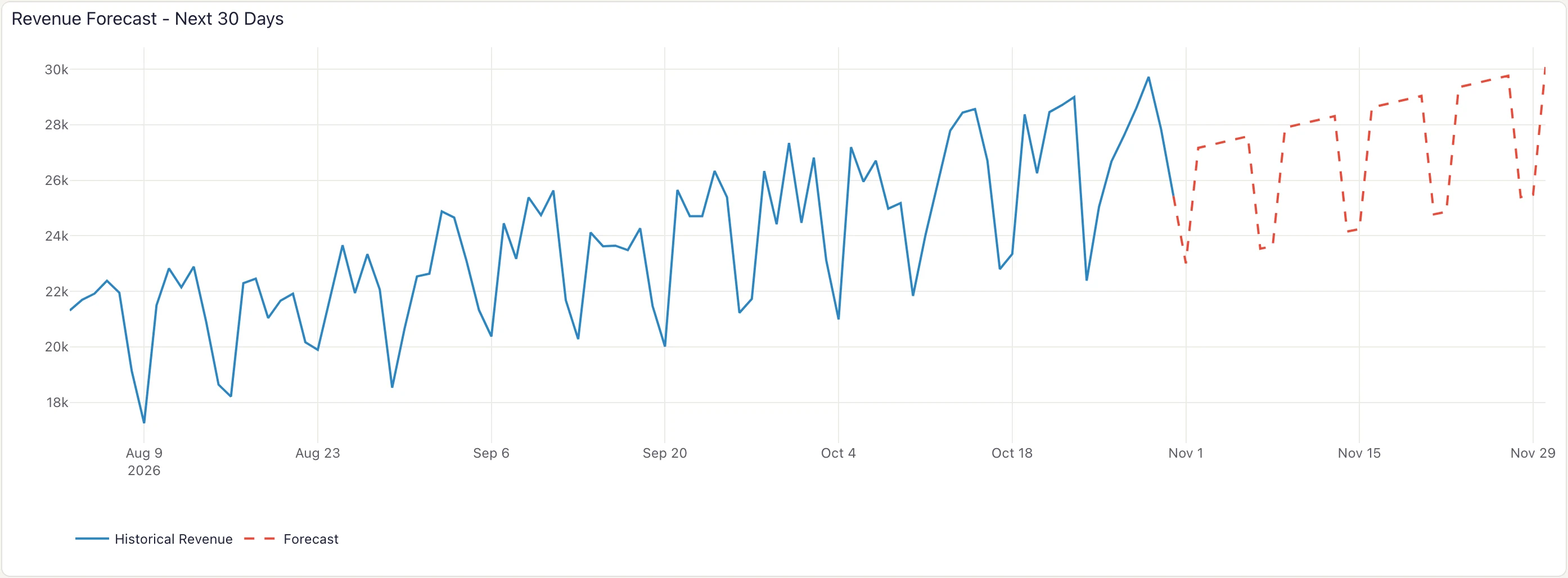 Revenue Forecast - Next 30 Days: two Insights on one model, filtered by is_forecast.
Performance
With existing_table: overwrite, the script runs on every visivo run, so its runtime is your refresh time. Two ways to keep it short:
Chunked and vectorized processing
# scripts/optimized_processor.py
import pandas as pd
import numpy as np
from concurrent.futures import ThreadPoolExecutor, ProcessPoolExecutor
import multiprocessing as mp

class OptimizedProcessor:
    def __init__(self, chunk_size=10000, max_workers=None):
        self.chunk_size = chunk_size
        self.max_workers = max_workers or mp.cpu_count()

    def process_large_dataset(self, data_source):
        """Process large datasets efficiently using chunking"""

        # Use chunking for memory efficiency
        chunks = []
        for chunk in pd.read_csv(data_source, chunksize=self.chunk_size):
            processed_chunk = self.process_chunk(chunk)
            chunks.append(processed_chunk)

        # Combine results
        return pd.concat(chunks, ignore_index=True)

    def process_chunk(self, chunk):
        """Process individual data chunk"""
        # Vectorized operations for speed
        chunk['revenue'] = chunk['quantity'] * chunk['price']
        chunk['profit_margin'] = (chunk['revenue'] - chunk['cost']) / chunk['revenue']

        # Efficient aggregations
        return chunk.groupby(['date', 'product_id']).agg({
            'revenue': 'sum',
            'profit_margin': 'mean',
            'quantity': 'sum'
        }).reset_index()

    def parallel_api_extraction(self, endpoints):
        """Extract from multiple APIs in parallel"""

        def fetch_endpoint(endpoint):
            response = requests.get(endpoint, headers=self.headers)
            return response.json()

        with ThreadPoolExecutor(max_workers=self.max_workers) as executor:
            results = list(executor.map(fetch_endpoint, endpoints))

        return results

    def memory_efficient_aggregation(self, large_dataframe):
        """Perform aggregations without loading entire dataset in memory"""

        # Use categorical data types for memory efficiency
        large_dataframe['category'] = large_dataframe['category'].astype('category')
        large_dataframe['region'] = large_dataframe['region'].astype('category')

        # Efficient groupby operations
        result = large_dataframe.groupby(['date', 'category', 'region']).agg({
            'revenue': ['sum', 'mean', 'count'],
            'profit': 'sum'
        })

        # Flatten column names
        result.columns = ['_'.join(col).strip() for col in result.columns]

        return result.reset_index()

if __name__ == "__main__":
    processor = OptimizedProcessor()

    # Process large dataset efficiently
    result = processor.process_large_dataset('data/large_sales_data.csv')

    # Output for Visivo
    print(result.to_csv(index=False))
Caching and incremental loads
# scripts/incremental_processor.py
import pandas as pd
import hashlib
import pickle
import os
from datetime import datetime

class IncrementalProcessor:
    def __init__(self, cache_dir='cache'):
        self.cache_dir = cache_dir
        os.makedirs(cache_dir, exist_ok=True)

    def get_cache_key(self, query, params=None):
        """Generate cache key for query and parameters"""
        content = f"{query}_{params}".encode('utf-8')
        return hashlib.md5(content).hexdigest()

    def load_from_cache(self, cache_key):
        """Load processed data from cache"""
        cache_file = os.path.join(self.cache_dir, f"{cache_key}.pkl")

        if os.path.exists(cache_file):
            # Check if cache is still valid (e.g., less than 1 hour old)
            cache_age = datetime.now().timestamp() - os.path.getmtime(cache_file)
            if cache_age < 3600:  # 1 hour
                with open(cache_file, 'rb') as f:
                    return pickle.load(f)

        return None

    def save_to_cache(self, data, cache_key):
        """Save processed data to cache"""
        cache_file = os.path.join(self.cache_dir, f"{cache_key}.pkl")
        with open(cache_file, 'wb') as f:
            pickle.dump(data, f)

    def incremental_data_load(self, table_name, last_processed_date=None):
        """Load only new data since last processing"""
        if last_processed_date:
            query = f"""
            SELECT * FROM {table_name}
            WHERE updated_at > '{last_processed_date}'
            ORDER BY updated_at
            """
        else:
            query = f"SELECT * FROM {table_name} ORDER BY updated_at"

        cache_key = self.get_cache_key(query)
        cached_data = self.load_from_cache(cache_key)

        if cached_data is not None:
            return cached_data

        # Fetch new data
        new_data = pd.read_sql(query, self.db_connection)

        # Cache the result
        self.save_to_cache(new_data, cache_key)

        return new_data

    def merge_incremental_updates(self, existing_data, new_data):
        """Merge new data with existing processed data"""
        if new_data.empty:
            return existing_data

        # Remove duplicates and merge
        combined = pd.concat([existing_data, new_data])
        return combined.drop_duplicates(subset=['id'], keep='last')

if __name__ == "__main__":
    processor = IncrementalProcessor()

    # Load state from previous run
    state_file = 'state/last_processed.txt'
    last_processed = None
    if os.path.exists(state_file):
        with open(state_file, 'r') as f:
            last_processed = f.read().strip()

    # Process only new data
    new_data = processor.incremental_data_load('sales', last_processed)

    if not new_data.empty:
        processed_data = process_sales_data(new_data)

        # Save current state
        os.makedirs('state', exist_ok=True)
        with open(state_file, 'w') as f:
            f.write(datetime.now().isoformat())

        # Output for Visivo
        print(processed_data.to_csv(index=False))
    else:
        # No new data, output empty result
        print("date,revenue,orders")  # Headers only
Monitoring and testing
The pipeline can report on itself. The script logs timing and quality metrics, prints them as CSV, and a seed keeps one row per run:
# scripts/monitored_pipeline.py
import logging
import time
from datetime import datetime
import sys

class PipelineMonitor:
    def __init__(self):
        self.setup_logging()
        self.metrics = {}

    def setup_logging(self):
        """Configure pipeline logging"""
        logging.basicConfig(
            level=logging.INFO,
            format='%(asctime)s - %(name)s - %(levelname)s - %(message)s',
            handlers=[
                logging.FileHandler('logs/pipeline.log'),
                logging.StreamHandler(sys.stdout)
            ]
        )
        self.logger = logging.getLogger(__name__)

    def monitor_execution_time(self, func):
        """Decorator to monitor function execution time"""
        def wrapper(*args, **kwargs):
            start_time = time.time()
            self.logger.info(f"Starting {func.__name__}")

            try:
                result = func(*args, **kwargs)
                execution_time = time.time() - start_time

                self.metrics[f"{func.__name__}_duration"] = execution_time
                self.logger.info(f"Completed {func.__name__} in {execution_time:.2f} seconds")

                return result

            except Exception as e:
                self.logger.error(f"Error in {func.__name__}: {str(e)}")
                self.metrics[f"{func.__name__}_error"] = str(e)
                raise

        return wrapper

    def track_data_quality_metrics(self, df, stage_name):
        """Track data quality metrics for monitoring"""
        metrics = {
            f"{stage_name}_row_count": len(df),
            f"{stage_name}_null_percentage": df.isnull().mean().mean() * 100,
            f"{stage_name}_duplicate_count": df.duplicated().sum(),
            f"{stage_name}_memory_usage_mb": df.memory_usage(deep=True).sum() / 1024 / 1024
        }

        self.metrics.update(metrics)

        # Log concerning metrics
        if metrics[f"{stage_name}_null_percentage"] > 10:
            self.logger.warning(f"High null percentage in {stage_name}: {metrics[f'{stage_name}_null_percentage']:.1f}%")

        if metrics[f"{stage_name}_duplicate_count"] > 0:
            self.logger.warning(f"Found {metrics[f'{stage_name}_duplicate_count']} duplicates in {stage_name}")

    def output_monitoring_data(self):
        """Output monitoring metrics for Visivo dashboard"""
        monitoring_df = pd.DataFrame([{
            'timestamp': datetime.now().isoformat(),
            'pipeline_run_id': f"run_{int(time.time())}",
            **self.metrics
        }])

        print(monitoring_df.to_csv(index=False))

# Usage in main pipeline
def main_pipeline():
    monitor = PipelineMonitor()

    # Decorate pipeline functions with monitoring
    @monitor.monitor_execution_time
    def extract_data():
        # Data extraction logic
        data = fetch_sales_data()
        monitor.track_data_quality_metrics(data, "extraction")
        return data

    @monitor.monitor_execution_time
    def transform_data(raw_data):
        # Transformation logic
        processed_data = apply_transformations(raw_data)
        monitor.track_data_quality_metrics(processed_data, "transformation")
        return processed_data

    try:
        # Run pipeline with monitoring
        raw_data = extract_data()
        processed_data = transform_data(raw_data)

        # Business data goes to a file; monitoring metrics go to stdout for the seed
        processed_data.to_csv('data/sales.csv', index=False)
        monitor.output_monitoring_data()

    except Exception as e:
        monitor.logger.error(f"Pipeline failed: {str(e)}")
        sys.exit(1)

if __name__ == "__main__":
    main_pipeline()
Chart the history and put a test on it. Pipeline health is then visible to the team and checked on every run, which is part of giving stakeholders numbers they can trust:
sources:
  - name: local
    type: duckdb
    database: target/local.duckdb
    seeds:
      - table_name: monitoring_data
        existing_table: append # keep one row per pipeline run
        args:
          - python
          - scripts/monitored_pipeline.py

models:
  - name: pipeline_monitoring
    source: ${ref(local)}
    sql: SELECT * FROM monitoring_data

insights:
  - name: pipeline-execution-time
    props:
      type: scatter
      mode: lines+markers
      x: ?{ ${ref(pipeline_monitoring).timestamp} }
      y: ?{ ${ref(pipeline_monitoring).extraction_duration} }
      name: "Extraction Time (s)"

  - name: data-quality-metrics
    props:
      type: scatter
      mode: lines+markers
      x: ?{ ${ref(pipeline_monitoring).timestamp} }
      y: ?{ ${ref(pipeline_monitoring).transformation_null_percentage} }
      name: "Null Percentage (%)"

tests:
  - name: extraction-under-five-minutes
    assertions:
      - ">{ numpy.max( ${ref(pipeline-execution-time).props.y} ) < 300 }"

dashboards:
  - name: Pipeline Health
    rows:
      - height: medium
        items:
          - chart:
              name: extraction-time
              insights:
                - ${ref(pipeline-execution-time)}
          - chart:
              name: null-percentage
              insights:
                - ${ref(data-quality-metrics)}
Schedule visivo run and visivo test together, for example in a scheduled CI job or cron. visivo test exits non-zero when an extraction takes longer than five minutes, so the job's own failure notification tells the team.
Conclusion
The whole integration is one contract: a script prints CSV, and a seed loads it. Everything else in this guide builds on that. pytest tests the script, visivo test tests the Insights, Docker and CI run both, and the same seed pattern covers forecasts and pipeline monitoring without new machinery.
What you end up with is an analytics system where the processing logic and the dashboard definition are both text in Git: reviewed in pull requests, tested before deploy, and reproducible from a clean checkout. That is BI-as-code with Python doing the heavy lifting.
For related topics, see dbt™ local development, CI/CD analytics implementation, and visualizations as code. To try the seed pattern yourself, /get-started takes you from install to a running project in a few minutes.