
CEO & Co-founder of Visivo
dbt Local Development for Faster Analytics Workflows
Set up local dbt development to accelerate analytics workflows with instant feedback and isolated testing.

Local dbt™ development lets a data engineer build and test transformations on their own machine, with a feedback loop measured in seconds. According to VentureBeat, "87% of data science projects never make it to production," and a slow development cycle with no immediate feedback is a common reason.
No waiting on a cloud warehouse, no shared development schema. Add Visivo and the same loop covers the dashboards too: model, chart and test all run on the laptop.
Why local development matters
Developing against a shared cloud warehouse has a cost at every step:
- Cloud delays: 30-60 seconds for every model run in a cloud warehouse
- Resource contention: shared development environments become a bottleneck
- Cost: every test run spends compute credits
- Less experimentation: nobody wants to break a shared resource
- No offline work: no connection, no development
MIT research finds that "Companies using data-driven strategies have 5-6% higher productivity." That gain depends on a workflow that lets people iterate quickly.
Local development removes that friction without giving up fidelity to production, as long as the tooling and the workflow are set up for it.
The local stack: dbt™, Visivo and DuckDB
Four tools cover the whole loop on one laptop:
- dbt™: transformations and data models
- Visivo: dashboards, visualizations and deployment
- DuckDB: a fast, embedded analytical database
- Git: version control and collaboration
This is the workflow behind developer-first BI and faster feedback cycles.
Local development setup
1. Install the stack
# Install dbt with your adapter (DuckDB for local development)
pip install dbt-core dbt-duckdb

# Install Visivo CLI
pip install visivo

# Or use the installation script
curl -fsSL https://visivo.sh | bash

# Verify installations
dbt --version
visivo --version
2. Project structure
One repository holds the dbt™ project and the Visivo configuration:
# Integrated dbt + Visivo project structure
analytics-project/
├── dbt_project.yml              # dbt configuration
├── project.visivo.yml           # Visivo configuration
├── profiles.yml                 # Database connections
├── .env                         # Environment variables
├── data/                        # Sample data files
│   ├── sample_orders.csv
│   └── sample_customers.csv
├── models/                      # dbt models
│   ├── staging/
│   │   ├── stg_orders.sql
│   │   └── stg_customers.sql
│   ├── intermediate/
│   │   └── int_customer_metrics.sql
│   └── marts/
│       ├── customer_analytics.sql
│       └── revenue_analysis.sql
├── tests/                       # dbt tests
│   └── assert_revenue_positive.sql
├── macros/                      # dbt macros
│   └── calculate_ltv.sql
└── visivo/                      # Visivo configurations
    ├── insights/
    │   ├── customer_insights.yml
    │   └── revenue_insights.yml
    └── dashboards/
        ├── executive.yml
        └── analytics.yml
3. Database configuration
Configure DuckDB as your local development database:
# profiles.yml
analytics_project:
  outputs:
    dev:
      type: duckdb
      path: ./dev.duckdb
      threads: 4
      extensions:
        - parquet
        - httpfs # For reading from S3/URLs if needed

  target: dev
# project.visivo.yml - Integrated with dbt
name: Local Analytics Development

# Integration with dbt: reads dbt_project.yml, profiles.yml and
# target/manifest.json from the working directory
dbt:
  enabled: true

defaults:
  source_name: duckdb_local

sources:
  - name: duckdb_local
    type: duckdb
    database: ./dev.duckdb

includes:
  - path: visivo/
With dbt: enabled: true, Visivo reads the dbt™ manifest on every visivo run and visivo serve. It turns each target in profiles.yml into a source named <profile>_<target> (here analytics_project_dev) and each dbt™ model into a Visivo model with the same name, so an Insight can reference ${ref(customer_analytics)} directly. Visivo uses the default target from profiles.yml; pass --dbt-target to pick another one.
Development workflow
Sample data
Load sample data that mirrors the production schema:
-- data/setup_sample_data.sql
-- Create sample tables that mirror production structure

CREATE OR REPLACE TABLE raw_orders AS
SELECT *
FROM read_csv_auto('data/sample_orders.csv');

CREATE OR REPLACE TABLE raw_customers AS
SELECT *
FROM read_csv_auto('data/sample_customers.csv');

-- Verify data loaded correctly
SELECT COUNT(*) as order_count FROM raw_orders;
SELECT COUNT(*) as customer_count FROM raw_customers;
# Load sample data
duckdb dev.duckdb < data/setup_sample_data.sql
dbt™ models
The models read the sample tables like any other source:
-- models/staging/stg_orders.sql
{{ config(materialized='view') }}

SELECT
    order_id,
    customer_id,
    order_date::date as order_date,
    order_amount::decimal(10,2) as order_amount,
    status,
    created_at::timestamp as created_at
FROM {{ source('raw', 'orders') }}
WHERE order_date >= '2023-01-01'
-- models/staging/stg_customers.sql
{{ config(materialized='view') }}

SELECT
    customer_id,
    customer_name,
    email,
    registration_date::date as registration_date,
    customer_segment,
    created_at::timestamp as created_at
FROM {{ source('raw', 'customers') }}
WHERE customer_segment IS NOT NULL
-- models/marts/customer_analytics.sql
{{ config(materialized='table') }}

WITH customer_orders AS (
    SELECT
        c.customer_id,
        c.customer_name,
        c.customer_segment,
        c.registration_date,
        COUNT(o.order_id) as total_orders,
        SUM(CASE WHEN o.status = 'completed' THEN o.order_amount ELSE 0 END) as total_revenue,
        MAX(o.order_date) as last_order_date,
        MIN(o.order_date) as first_order_date
    FROM {{ ref('stg_customers') }} c
    LEFT JOIN {{ ref('stg_orders') }} o ON c.customer_id = o.customer_id
    GROUP BY c.customer_id, c.customer_name, c.customer_segment, c.registration_date
)

SELECT
    *,
    CASE
        WHEN total_orders = 0 THEN 'inactive'
        WHEN total_orders = 1 THEN 'one_time'
        WHEN total_orders < 5 THEN 'low_frequency'
        WHEN total_orders < 10 THEN 'medium_frequency'
        ELSE 'high_frequency'
    END as frequency_segment,

    CASE
        WHEN total_revenue = 0 THEN 'no_value'
        WHEN total_revenue < 100 THEN 'low_value'
        WHEN total_revenue < 500 THEN 'medium_value'
        ELSE 'high_value'
    END as value_segment,

    CASE
        WHEN total_orders > 0 THEN total_revenue / total_orders
        ELSE 0
    END as avg_order_value,

    CASE
        WHEN last_order_date >= CURRENT_DATE - 90 THEN 'active'
        WHEN last_order_date >= CURRENT_DATE - 180 THEN 'at_risk'
        ELSE 'churned'
    END as lifecycle_stage

FROM customer_orders
Insights on dbt™ models
The Insights reference the dbt™ model customer_analytics by name. For the wider pattern, see BI-as-code scalable systems and dbt™ BI integration:
# visivo/insights/customer_insights.yml
insights:
  - name: customer_value_distribution
    props:
      type: scatter
      mode: markers
      x: ?{ ${ref(customer_analytics).total_orders} }
      y: ?{ ${ref(customer_analytics).total_revenue} }
      marker:
        size: ?{ ${ref(customer_analytics).avg_order_value} }
        sizemode: diameter
        sizeref: 8
        opacity: 0.7
      text: ?{ ${ref(customer_analytics).customer_name} }
      hovertemplate: |
        Customer: %{text}<br>
        Orders: %{x}<br>
        Revenue: $%{y:,.2f}<br>
        AOV: $%{marker.size:,.2f}<br>
        <extra>%{fullData.name}</extra>
    interactions:
      - split: ?{ ${ref(customer_analytics).customer_segment} }

  - name: customer_lifecycle_funnel
    props:
      type: funnel
      x: ?{ COUNT(${ref(customer_analytics).customer_id}) }
      y: ?{ ${ref(customer_analytics).lifecycle_stage} }
      text: ?{ COUNT(${ref(customer_analytics).customer_id}) }
      texttemplate: "%{text} customers"
    interactions:
      - split: ?{ ${ref(customer_analytics).lifecycle_stage} }

  - name: segment_performance_heatmap
    props:
      type: heatmap
      x: ?{ ${ref(customer_analytics).frequency_segment} }
      y: ?{ ${ref(customer_analytics).value_segment} }
      z: ?{ SUM(${ref(customer_analytics).total_revenue}) }
      colorscale: "Blues"
      text: ?{ SUM(${ref(customer_analytics).total_revenue}) }
      texttemplate: "$%{text:,.0f}"
# visivo/dashboards/customer_analytics.yml
dashboards:
  - name: Customer Analytics Dashboard
    description: "Comprehensive customer behavior and segmentation analysis"

    rows:
      - height: compact
        items:
          - markdown: |
              # Customer Analytics Dashboard

              Real-time insights into customer behavior, segmentation, and lifetime value.

              **Data Source:** Local development database
              **Model Used:** customer_analytics (dbt)

      # KPI Row
      - height: small
        items:
          - width: 1
            chart:
              name: total-customers-kpi
              insights:
                - name: total-customers
                  props:
                    type: indicator
                    mode: number
                    value: ?{ COUNT(DISTINCT ${ref(customer_analytics).customer_id}) }[0]
                    title:
                      text: "Total Customers"
                    number:
                      font:
                        size: 24

          - width: 1
            chart:
              name: total-revenue-kpi
              insights:
                - name: total-revenue
                  props:
                    type: indicator
                    mode: number
                    value: ?{ SUM(${ref(customer_analytics).total_revenue}) }[0]
                    title:
                      text: "Total Revenue"
                    number:
                      prefix: "$"
                      font:
                        size: 24

          - width: 1
            chart:
              name: average-aov-kpi
              insights:
                - name: average-aov
                  props:
                    type: indicator
                    mode: number
                    value: ?{ AVG(${ref(customer_analytics).avg_order_value}) }[0]
                    title:
                      text: "Average AOV"
                    number:
                      prefix: "$"
                      font:
                        size: 24

      # Main Analysis
      - height: large
        items:
          - width: 2
            chart:
              name: customer-value-chart
              insights:
                - ${ref(customer_value_distribution)}
              layout:
                title:
                  text: "Customer Value Distribution"
                xaxis:
                  title:
                    text: "Total Orders"
                yaxis:
                  title:
                    text: "Total Revenue ($)"

          - width: 1
            chart:
              name: customer-lifecycle-chart
              insights:
                - ${ref(customer_lifecycle_funnel)}
              layout:
                title:
                  text: "Customer Lifecycle"

      # Detailed Analysis
      - height: medium
        items:
          - width: 3
            chart:
              name: segment-performance-chart
              insights:
                - ${ref(segment_performance_heatmap)}
              layout:
                title:
                  text: "Segment Performance Matrix"
                xaxis:
                  title:
                    text: "Frequency Segment"
                yaxis:
                  title:
                    text: "Value Segment"
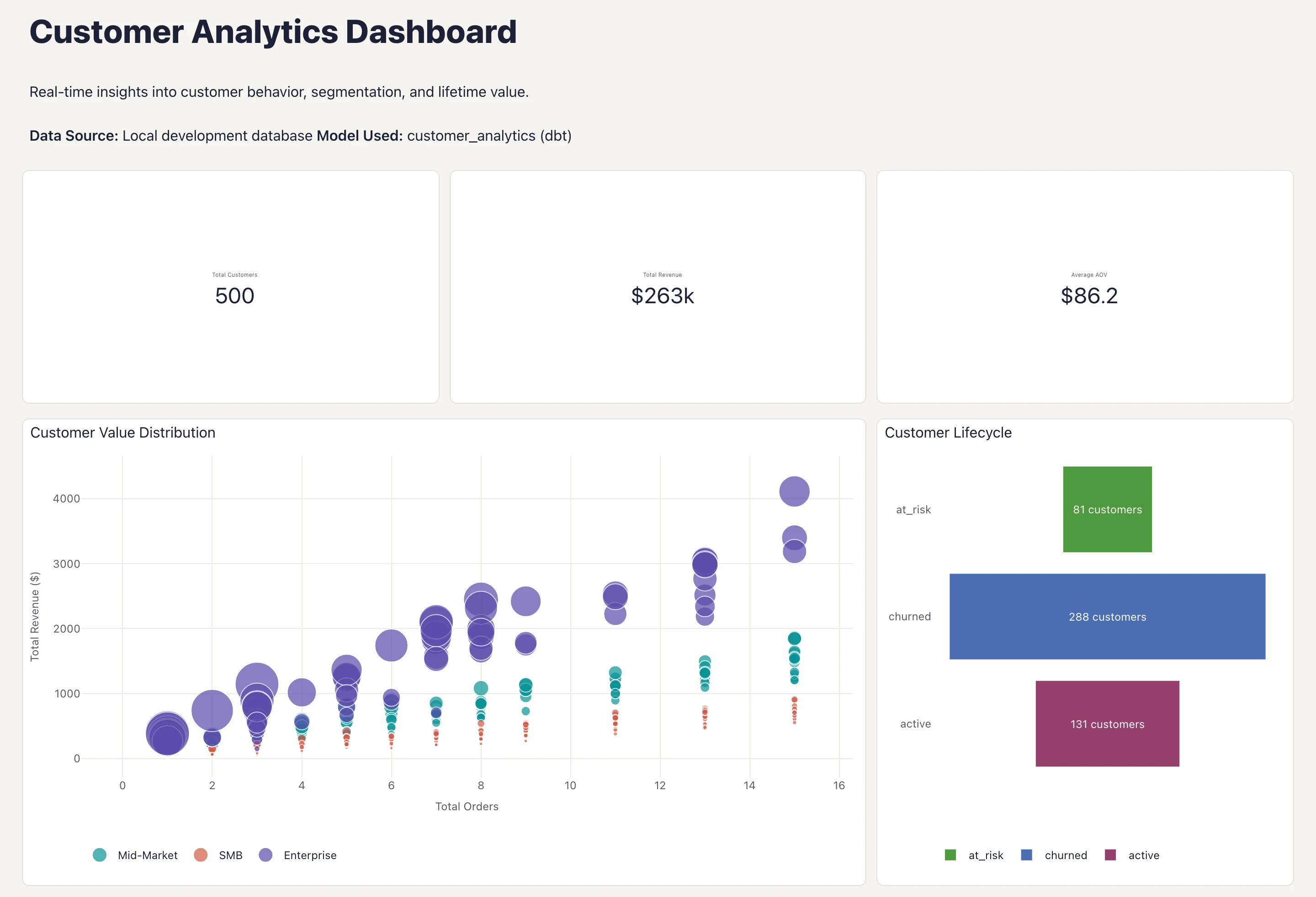 Customer Analytics Dashboard reading the dbt™-built customer_analytics model through Visivo's dbt™ integration, with synthetic sample data.
The fast loop
The 30-second cycle
The whole cycle, model to dashboard, fits in one script:
#!/bin/bash
# fast_dev_loop.sh - Complete development and testing cycle

echo "Starting fast development cycle..."

# Step 1: Run dbt models (5-10 seconds)
echo "Running dbt models..."
time dbt run --select customer_analytics

# Step 2: Test dbt models (2-3 seconds)
echo "Testing dbt models..."
time dbt test --select customer_analytics

# Step 3: Start Visivo server (5 seconds)
echo "Starting Visivo dashboard server..."
visivo serve --port 8080 &
SERVER_PID=$!

# Step 4: Open browser to dashboard
sleep 2
echo "Opening dashboard in browser..."
open http://localhost:8080

echo "Total cycle time: ~30 seconds"
echo "Dashboard server running at http://localhost:8080"
echo "Press Ctrl+C to stop server"

# Wait for user to stop
wait $SERVER_PID
Watch mode
Rebuild on save with a file watcher:
# Terminal 1: Watch dbt models for changes
watchfiles 'dbt run --select customer_analytics' models/

# Terminal 2: Run the Visivo development server
visivo serve --port 8080

# Terminal 3: Your editor for making changes
code models/marts/customer_analytics.sql
When you save a dbt™ model:
- watchfiles detects the change and runs
dbt run - Visivo rebuilds and reruns the project when a Visivo YAML file changes, so save a Visivo YAML file (or restart
visivo serve) to pull in the new dbt™ output - Browser shows the updated dashboard
Our faster feedback cycles guide goes deeper on why this loop matters.
More local patterns
Several local environments
dbt™ targets give you more than one local database:
# profiles.yml - Multiple local environments
analytics_project:
  outputs:
    # Fast development with DuckDB
    dev:
      type: duckdb
      path: ./dev.duckdb
      threads: 4

    # Sample data environment
    sample:
      type: duckdb
      path: ./sample.duckdb
      threads: 2

  target: dev
# Switch between environments easily
dbt run --target dev            # Uses DuckDB
visivo serve --dbt-target dev

dbt run --target sample         # Uses sample data
visivo serve --dbt-target sample
Keep profiles.yml free of templated values that Visivo needs to read. Visivo parses profiles.yml as plain YAML and does not render dbt™ Jinja, so a templated target: is not found. Visivo also turns every target in profiles.yml into a source, and its dbt™ integration does not accept a target of type postgres, so keep Postgres targets out of the profiles.yml that Visivo reads.
Sample data from production
Pull an anonymized sample from production so local results look like real ones:
-- scripts/create_sample_data.sql
-- Run this against production to create sample datasets

-- Sample orders (last 90 days, anonymized)
COPY (
    SELECT
        order_id,
        'cust_' || ROW_NUMBER() OVER () as customer_id,  -- Anonymize
        order_date,
        order_amount,
        status,
        created_at
    FROM orders
    WHERE order_date >= CURRENT_DATE - 90
    ORDER BY RANDOM()
    LIMIT 10000
) TO 'sample_orders.csv' (HEADER, DELIMITER ',');

-- Sample customers (anonymized)
COPY (
    SELECT
        'cust_' || ROW_NUMBER() OVER () as customer_id,  -- Anonymize
        'Customer ' || ROW_NUMBER() OVER () as customer_name,
        'user' || ROW_NUMBER() OVER () || '@example.com' as email,
        registration_date,
        customer_segment,
        created_at
    FROM customers
    WHERE created_at >= CURRENT_DATE - 365
    ORDER BY RANDOM()
    LIMIT 5000
) TO 'sample_customers.csv' (HEADER, DELIMITER ',');
Performance testing
Profile your models locally before deploying:
# Profile dbt model performance
dbt run --select customer_analytics --profiles-dir . --profile analytics_project --target dev

# Use DuckDB's EXPLAIN for query optimization
duckdb dev.duckdb -c "EXPLAIN SELECT * FROM customer_analytics LIMIT 100;"

# Test with larger datasets
dbt run --select customer_analytics --vars '{"start_date": "2020-01-01"}'
From local to production
The deploy pipeline
The commands that run locally run the same way against staging and production targets. See managing staging and production environments for the full pattern:
#!/bin/bash
# deploy_pipeline.sh

# Step 1: Final local testing
echo "Running final local tests..."
dbt test --target dev
visivo run --dbt-target dev
visivo test

# Step 2: Deploy to staging with production data structure
echo "Deploying to staging..."
dbt run --target staging
dbt test --target staging
visivo run --dbt-target staging
visivo test
visivo deploy -s staging

# Step 3: Deploy to production
echo "Deploying to production..."
dbt run --target prod
visivo run --dbt-target prod
visivo deploy -s production

echo "Deployment complete!"
Configuration across environments
One project.visivo.yml declares every source, and environment variables fill in the credentials:
# project.visivo.yml
name: Analytics Project

# The default source for models that do not come from dbt
defaults:
  source_name: duckdb_local

sources:
  # Local development
  - name: duckdb_local
    type: duckdb
    database: ./dev.duckdb

  # Staging environment
  - name: postgres_staging
    type: postgresql
    host: ${env.STAGING_DB_HOST}
    database: analytics_staging
    username: ${env.STAGING_DB_USER}
    password: ${env.STAGING_DB_PASSWORD}

  # Production environment
  - name: postgres_prod
    type: postgresql
    host: ${env.PROD_DB_HOST}
    database: analytics_prod
    username: ${env.PROD_DB_USER}
    password: ${env.PROD_DB_PASSWORD}

includes:
  - path: visivo/
${env.VAR_NAME} works on source connection fields, and Visivo loads a .env file from the project root. To use a different default source in one environment, pass --source (for example visivo run --source postgres_staging). Models that come from dbt™ use the dbt™ target you pick with --dbt-target.
The speed difference
Development speed
Local dbt™ + Visivo development can bring large improvements. Grand View Research finds that "The global data analytics market will reach $684.12 billion by 2030" as organizations invest in efficient development workflows. The numbers that matter day to day:
Model development speed:
- Local DuckDB: 2-5 seconds per model run
- Cloud warehouse: 30-60 seconds per model run
- Speedup: Significantly faster development cycles
Dashboard development speed:
- Local development: Instant feedback on chart changes
- Cloud deployment: 2-5 minutes per deployment
- Speedup: Real-time development vs. batch deployment
Cost reduction:
- Development costs: Substantial reduction (no cloud compute during development)
- Experimentation: Unlimited without cost concerns
- Resource efficiency: No shared environment contention
Getting started
Quick start
# 1. Set up project structure
mkdir analytics-local-dev && cd analytics-local-dev

# 2. Initialize dbt project
dbt init . --skip-profile-setup

# 3. Initialize Visivo project (--bare writes the files without starting the server)
visivo init --bare

# 4. Install DuckDB
pip install dbt-duckdb

# 5. Configure for local development
cat > profiles.yml << EOF
analytics_local_dev:
  outputs:
    dev:
      type: duckdb
      path: ./dev.duckdb
      threads: 4
  target: dev
EOF

# 6. Create sample data
mkdir data
echo "order_id,customer_id,order_date,order_amount,status" > data/sample_orders.csv
echo "1,cust_1,2024-01-15,99.99,completed" >> data/sample_orders.csv

# 7. Run first model
dbt run

# 8. Turn on the dbt integration in project.visivo.yml
cat >> project.visivo.yml << EOF
dbt:
  enabled: true
EOF

# 9. Start the Visivo development server
visivo serve
Team adoption
- Standardize local environments: Use Docker or conda so every machine matches
- Share sample datasets: Keep one realistic, anonymized sample in the repository
- Document workflows: Write a team runbook for local development
- Migrate gradually: Start with new projects, then move existing ones
- Train the team: Budget time for people to learn the local tools
Local dbt™ plus Visivo gives analytics the development loop software engineers already have: edit, run, see the result, in seconds, on your own machine, offline if you need to.
For related topics, explore our guides on reproducible BI environments, CI/CD analytics implementation, and visualizations as code.
The quick start above takes a few minutes. /get-started covers installing Visivo, and the Visivo documentation has the full reference for the dbt™ integration.