
CEO & Co-founder of Visivo
Visivo v2.3.0: One-Click Samples and Self-Checking Agents
Visivo v2.3.0 opens a sample dashboard in one click, lets the agent check its build and screenshot its work, and applies one set of save rules to every writer.
Visivo v2.3.0 gets a new user from visivo init to a dashboard with data in one click, and teaches the agent to check its own work before it says it is done. It also puts every project save behind one set of rules, adds visivo format, and fixes a long list of dashboard and CLI rough edges.
The v2.3.0 release shipped on November 4, 2026. It covers everything merged since v2.2.1.
From visivo init to a dashboard in one click
Before this release, a new project opened on a welcome screen, then a role question, seven concept cards and a data step before you could pick a sample. v2.3.0 replaces that with one start screen. It shows three bundled samples (EV Sales, GitHub Releases and College Football), then "Connect your own data", "Start with an empty project" and an optional concept tour.
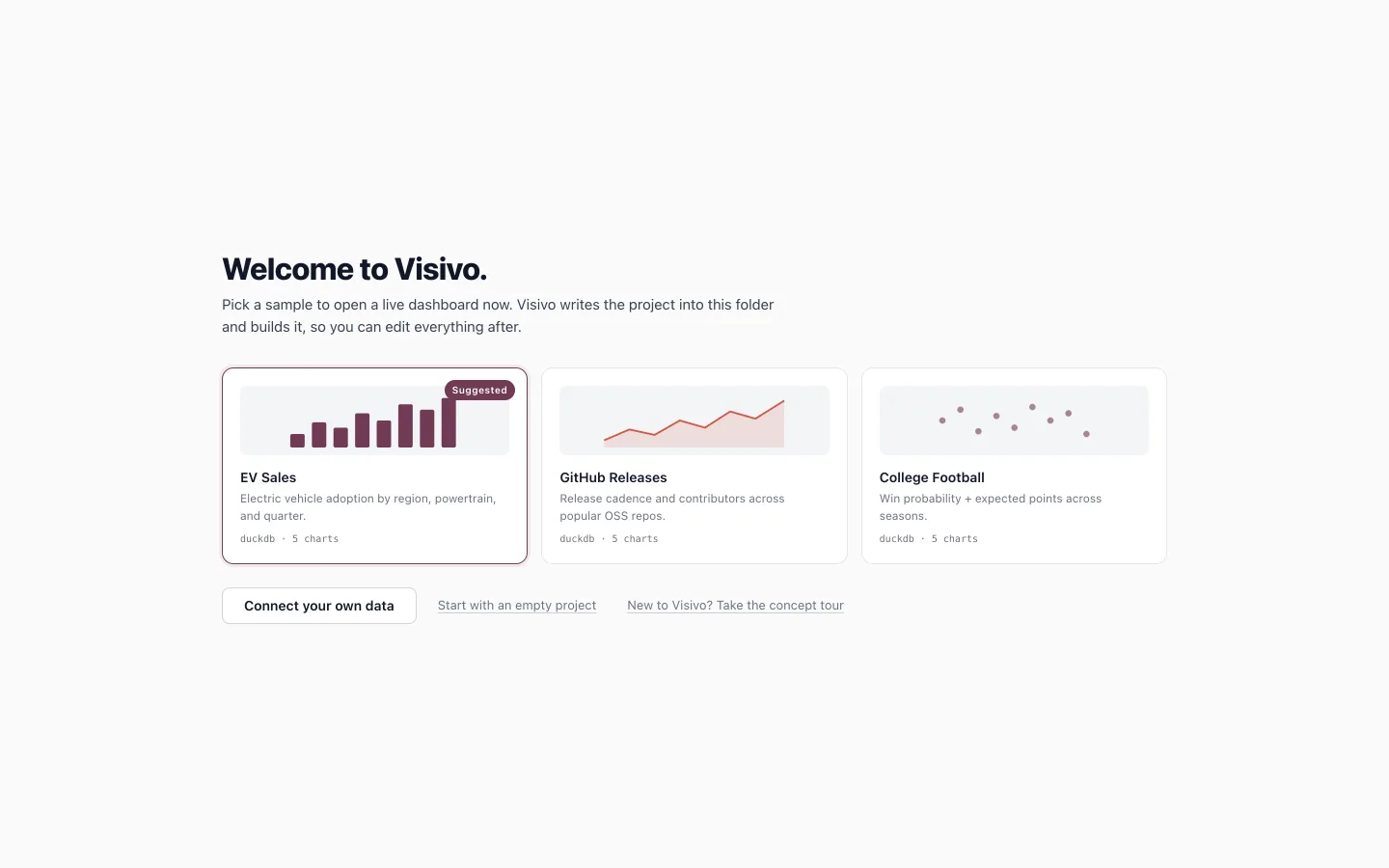
One click on a sample writes the project into your folder, builds it, and opens its dashboard. In our timing runs on a laptop, a chart with data drew about five seconds after visivo init, server start included and the click not counted. With v2.2.1 the same path did not draw a chart within the 90 second timeout.
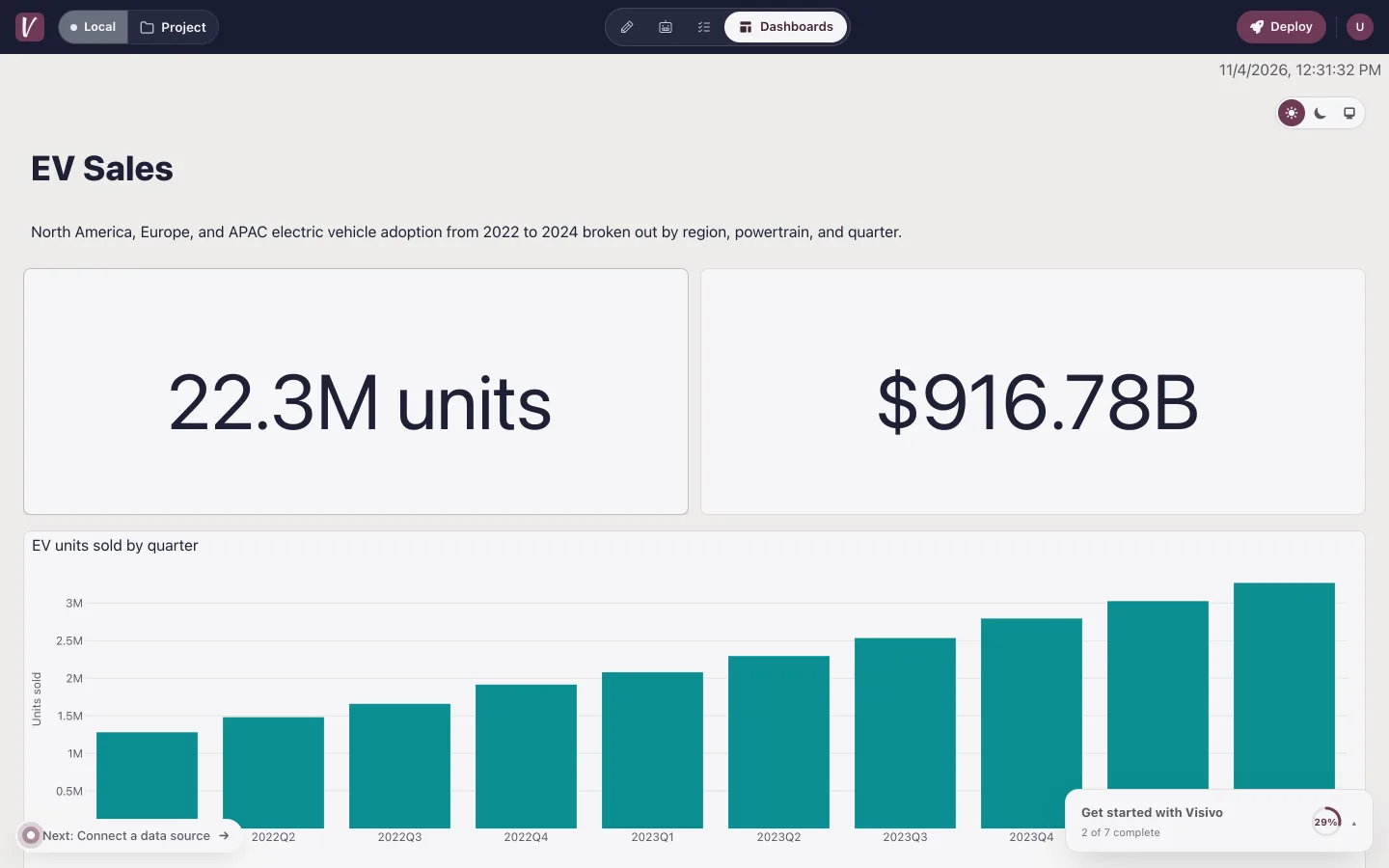
If you already know which sample you want, skip the screen:
visivo init --example ev-sales
--example accepts ev-sales, github-releases and college-football, builds the sample before the browser opens, and lands on its dashboard. The samples now ship inside the release binary too, so this works with the visivo.sh install and with pip. The getting-started checklist moved to the bottom-right corner, where it no longer covers Run all, and it starts collapsed on a phone.
Two related fixes make an empty folder a safe place to start. Committing from visivo serve in a folder with no project.visivo.yml now creates the file instead of failing. The first source you add becomes the project's default source, so the first model you write next to it runs without a "does not specify a source" error.
New to the concepts behind the samples? The examples page and getting-started guide walk through them.
The agent checks its build and looks at the dashboard
v2.2.1 gave the agent tools to read your data. v2.3.0 makes it verify what it wrote before it reports back.
check_runsreports whether a build is still running and whether the newest run succeeded, with diagnostics when it failed. The agent's instructions now say a change is done only when nothing is still building and the newest run succeeded. If a write was only staged, the agent says so.screenshot_dashboardcaptures a dashboard by name once its run settles, and hands the image to the model. A skill tells the agent which problems are easy to see in a picture and hard to see in YAML (an empty chart, a legend over the plot, a clipped title, colliding ticks) and to fix and capture again rather than report and stop. MCP clients receive the capture as an image block, so Claude Code and other clients see it too.- The Agent tab fills in as the turn works. Tool calls appear while they run, not all at once when the turn ends, and a turn you stop keeps the tool calls it made. Each capture shows under the tool call that took it, so you can see what the agent saw.
Better chart choices, and warnings at write time
The agent also gets more help choosing and writing charts:
recommend_chartsranks chart types for a set of metrics and dimensions and returns ready-to-write YAML for the top three, validated as a chart.score_candidatesproposes metrics, dimensions and a varied set of Insights worth showing, scored on signals such as trend, concentration and anomalies, and checked against your semantic layer.- On-demand chart skills cover each chart family the rules know.
- Write-time warnings. When an Insight validates but will render wrong, the write succeeds and returns a warning with the fix. Examples: a line with no
sortinteraction, so it zig-zags; a KPI label in the number prefix; a percent format over a value already multiplied by 100; a column inside a${ref()}; a color scale that makes the highest values palest; a dashboard item that does not exist.
MCP clients now receive the always-on skills in the connection handshake, so an agent over /api/mcp/ follows the same rules as the built-in one, including the rule that text in your data is data, not instructions. profile_model also works on a model that has not been built yet, and describe_source can refresh a source's schema when you add tables.
The Agent page has a collapsed Use your own agent section with copy-ready setup for Claude Code, Cursor and Gemini CLI. It shows on local visivo serve. The MCP setup guide has the details, and the AI readiness overview explains why a typed project and a semantic layer help an agent.
One set of rules for every save
The editor, the agent's tools over MCP or in the Agent tab, and rename all write project objects. In v2.3.0 they all pass through the same save check in the local server, so a rule cannot be skipped by using a different writer. A save is refused, with one message, when:
- the name is already held by another object, of any type (the agent also gets a free name to use);
- a new name does not follow the naming rules;
- a project-level metric or dimension does not reference a model;
- a model's SQL does not parse in its source's dialect;
- an Insight filter does not parse (see the upgrade notes).
Visivo Cloud applies the same name rule on every editor save. Related fixes: a project can now share its name with its only source, Test Connection fails for a SQLite or DuckDB file that does not exist instead of creating an empty one, and in Visivo Cloud the source form lets you pick an existing secret instead of typing the name of one that may not exist.
CLI: visivo format, agents and CI
visivo formatrewrites project YAML in one canonical style, with key order taken from the models. Comments and list order are kept.visivo format --checkexits non-zero when a file is not canonical, for CI.visivo authorizeworks without a terminal. Scripts, CI and agents such as Claude Code can run it: it prints the URL, waits for the callback, and exits 1 on timeout instead of crashing.--replacereplaces an existing token without a prompt.visivo testevaluates Insight assertions against the output ofvisivo run, withnumpyfunctions, slices andlen, and prints the compared values when an assertion fails. See the testing guide.visivo listaccepts every object type: sources, models, metrics, dimensions, relations, insights, charts, tables, markdowns, inputs and dashboards.visivo distexits non-zero when it fails and prints how to serve the result.- dbt™:
dbt_project_yml_locationandprofiles_yml_locationaccept a file or a folder, a missingtarget-pathdefaults totarget, andvisivo dbtexplains what to add when the project has nodbtblock. See the dbt™ guide and sources and dbt™. - Sources: a server source's
portaccepts${env.NAME}, and DuckDB sources see tables in every schema and attached database, so a model can readanalytics.fct_mrr. - A complete install. The local viewer and CLI no longer fetch the SQL editor, the hot-reload script or a DuckDB extension for CSV uploads at runtime. Map tiles still need the network, and a map chart now says so instead of showing a grey box. The network access page lists what needs a connection.
The full list is in the CLI reference and on the CLI and DevOps page.
Dashboards that explain themselves
- A chart whose data has not been built, whose query returns no rows, or whose data request fails now shows a notice that says which case it is, instead of a spinner or empty axes.
- Table CSV exports use the headers the table shows, leave null cells blank and write dates as displayed.
- Input references resolve in a chart's layout, so a title like
Threshold ${ref(split_threshold).value}updates with the input. - An Insight's
props.nameshows in the chart legend. - Escape closes every modal, menu and popover in the viewer, one layer per keypress.
- The Workspace canvas keeps the desktop layout at desktop width and fits a 390 pixel phone, and stacked charts keep their row height on phones.
- Aggregate metrics with
FILTER (WHERE ...)no longer split every group, markdown items no longer crash a dashboard, an unknown dashboard name shows a not-found page, and date-range calendars are no longer clipped by their row. - The Library lists metrics and dimensions defined inside models, and Cmd/Ctrl+Enter runs the editor's current text.
See dashboards and Insights for the bigger picture.
In Visivo Cloud
app.visivo.io now runs the v2.3.0 viewer, so the chart notices, Escape handling and phone layout above apply there too. Cloud also gains branch work:
- New branch creates a branch from the UI.
- A committed branch on a project without a GitHub link can be merged into the default branch with Merge into default. Independent changes to different objects merge; when the same object changed on both sides, the merge lists the conflicting objects.
- New Project shows only where your role allows it. An editor is offered a branch first.
The cloud deploys page covers how projects move between the CLI and the cloud.
Upgrade notes
An Insight filter that does not parse is now an error. Before, a filter that SQLGlot could not parse was dropped with no message, so the Insight rendered unfiltered. The most common case is a multi-select's .values in an IN without parentheses. visivo run now fails that Insight with:
Insight 'units_by_quarter_filtered' has a filter that is not valid SQL: ${ref(ev_sales).region} IN ${ref(regions).values}. Hint: wrap the values in parentheses: IN (${ref(regions).values})
Wrap the values in parentheses:
inputs:
  - name: regions
    type: multi-select
    options: ["North America", "Europe", "APAC"]
    display:
      type: checkboxes
      default:
        values: all

insights:
  - name: units_by_quarter_filtered
    props:
      type: bar
      x: ?{ ${ref(ev_sales).quarter} }
      y: ?{ SUM(${ref(ev_sales).units_sold}) }
    interactions:
      - filter: ?{ ${ref(ev_sales).region} IN (${ref(regions).values}) }
      - sort: ?{ ${ref(ev_sales).quarter} ASC }
The editor and the agent refuse the same filter when you save it. The inputs guide covers multi-select inputs.
Unknown keys on Insight interactions are rejected. An interaction accepts filter, split and sort. A key such as click: used to validate and do nothing; it now fails compile with Extra inputs are not permitted at the interaction's path.
DuckDB db_schema now applies at query time. Visivo runs SET schema on connect when db_schema is set. Before, DuckDB ignored the field. Check models that relied on unqualified names resolving to main while db_schema named another schema.
Install. Visivo needs Python 3.12 or later for a pip or uv install. The visivo.sh installer uses the Apple silicon build under Rosetta, and on an Intel Mac, which has no binary build, it says so and points to pip install visivo. To install this release:
curl -fsSL https://visivo.sh | bash -s -- --version 2.3.0
# or
pip install visivo==2.3.0
The full v2.3.0 changelog lists every change.
Previously in Visivo
The v2.2.0 recap introduced the Agent tab, MCP project tools, project themes and HTML template dashboards. The v2.2.1 release followed with the agent's read-only data tools and table fixes. v2.3.0 makes the first run fast and makes the agent prove its work.