
CTO & Co-founder of Visivo
Static Dashboards Are Back: BI on Any Static Host
DuckDB-WASM and parquet let a dashboard ship as a folder of files. When a static bundle beats a BI server, what it costs, and how to publish one safely.
A dashboard no longer needs a server. With DuckDB compiled to WebAssembly and query results stored as parquet, the browser can do the querying, and the whole dashboard can ship as a folder of files on any static host. For a large class of dashboards, that is simpler, cheaper to run and easier to reason about than a BI server. It also has sharp edges that are easy to miss. This post covers both.
Why the static dashboard came back
For most of BI's history, "interactive" meant "a server is running". A filter change sent a request to an application server, the server queried the warehouse, and the browser drew the result. If you wanted to publish a dashboard, you also signed up to operate that server, its database connections and its login.
Two pieces of the modern stack changed that.
The first is DuckDB-WASM, the DuckDB analytical engine compiled to WebAssembly. It runs SQL inside the browser tab: group-bys, filters, sorts and joins over local data, with no round trip.
The second is parquet. A columnar, compressed file is a good format to send over the wire, and DuckDB reads it directly. We wrote about why parquet became the default earlier this year.
Put the two together and the old split moves. The expensive query against the warehouse runs once, at build time. The cheap, interactive queries (this region, that quarter, sorted by revenue) run in the reader's browser against the files that the build produced. The server that used to sit in the middle has nothing left to do.
What a static bundle actually is
In Visivo, the build step is two commands:
visivo run    # run the project's queries and write the results
visivo dist   # package the viewer and those results into ./dist
visivo dist runs no queries of its own. It packages what the last visivo run left behind: the viewer application, its JavaScript (including DuckDB-WASM), JSON manifests for each dashboard, chart and input, and one parquet file per query result. It also re-encodes each parquet file with stronger ZSTD compression and ships whichever copy is smaller, because every visitor downloads it.
The result is not a screenshot. It is the same viewer that visivo serve runs, reading pre-computed data. Charts, tables and markdown render with the same layout. Inputs and chart interactions (filter, sort, split) re-run in DuckDB-WASM against the bundled parquet, so changing a dropdown never touches your database.
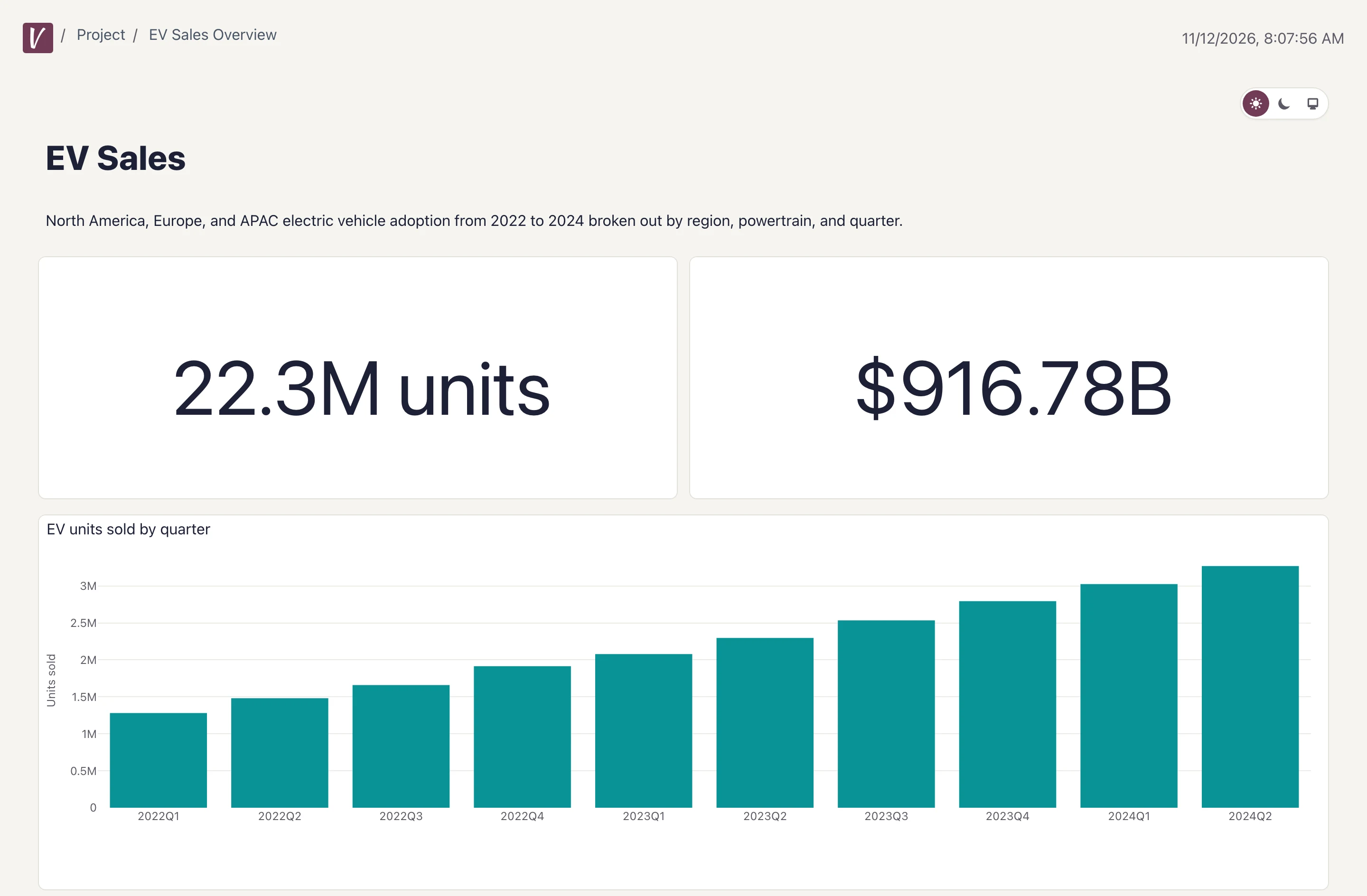
That screenshot is the bundled EV Sales sample, built with visivo dist --deployment-root /ev-dashboards and served by python -m http.server. No Visivo process was running. The dist/ folder came to 49 MB, nearly all of it the viewer and the DuckDB-WASM engine; the data files for this sample total 20 KB.
When static beats a server
A static bundle is the right call when these are true:
- The data can be a snapshot. Nightly or hourly numbers are fine. Nobody needs the row that landed a minute ago.
- The audience can see every row you ship. More on this below, because it is the one that bites.
- You want nothing to operate. No runtime, no database driver on the host, no environment variables, no process to restart. An object storage bucket, Netlify, Cloudflare Pages, GitHub Pages or an nginx directory will all serve it.
- The interaction fits inside the shipped data. Filtering, sorting and splitting a result set you already have is fast and free. Asking for rows the build never wrote is impossible.
Good fits: a public report, a metrics page for a board or an open source community, a dashboard on a static host you already run behind your VPN, and a read-only copy for a team with no BI login.
The costs nobody puts on the landing page
Static dashboards have real tradeoffs. Here are the ones we run into, from most to least serious.
The data ships in the bundle. Each parquet file holds the full result set of a query, every row, including columns that no chart displays. The JSON manifests carry your dashboard configuration and your models' SQL text. Anyone who can fetch the files can read them, and an unlisted URL is not protection. Before you publish, either accept that every row is visible to the audience, or put the files behind access control that you provide, such as a VPN, reverse-proxy authentication or your host's protected-site feature.
The fix is mostly in your models. Aggregate in SQL. A model that ships GROUP BY region, quarter exposes one row per region and quarter; a model that ships raw orders exposes your customers. Smaller result sets also make a smaller bundle, so the safe choice and the fast choice are the same choice.
Connection credentials are a different story. In Visivo, a model's source: ${ref(my_db)} and any ${env.NAME} reference ship unresolved, so sources defined at the top level of a project and secrets kept in environment variables stay out of the bundle. The static distribution guide covers the one exception: a source written inline inside a model is embedded with that model.
The data is frozen. A bundle never queries your sources again. To refresh it, rebuild and re-upload. Visivo has no scheduler for this, so the refresh is a job you own in your CI or cron (see the next section).
"No server" does not mean "no network". DuckDB-WASM ships in the bundle, but its parquet extension downloads from extensions.duckdb.org the first time a dashboard reads data, and map charts fetch basemap assets. On an egress-filtered network, allowlist those hosts before you promise anyone an air-gapped dashboard.
The engine is big. DuckDB-WASM is the largest file in the bundle. A host that compresses (Netlify, Cloudflare Pages, nginx with gzip) sends far fewer bytes than the file size. A host that serves files exactly as stored, such as a plain bucket, does not. For that case, visivo dist --duckdb-from-cdn loads the same engine from jsDelivr, compressed. The v2.3.1 and v2.3.2 recap has the before and after sizes.
There is no editing and no login. A bundle is strictly view-only, and it has no permissions of its own.
How to publish one without surprises
A few habits make static dashboards boring in the good way.
Build in CI from a clean checkout, and check the output. visivo dist packages the last run. If the run did not happen, it prints an error but still exits with status 0, so a pipeline will not stop on its own. Delete the old bundle and test for the new one:
rm -rf dist
visivo run
visivo dist --deployment-root /reports
test -s dist/index.html || { echo "No bundle. Did visivo run succeed?"; exit 1; }
# then upload dist/ with your host's CLI
Put that on a schedule in your CI system and the dashboard refreshes as often as the job runs. The CI/CD guide shows the surrounding setup.
Set the deployment root when you host under a path. A GitHub Pages project site, for example, lives under /<repo-name>. --deployment-root rewrites every asset and data URL for that prefix. Without it, the page loads blank.
Configure deep links. The bundle includes a _redirects file with a single-page-app fallback, which Netlify and Cloudflare Pages read. Other hosts need the equivalent rewrite (for nginx, try_files $uri /index.html;), or dashboard links will 404 on refresh.
Save your work before you build. visivo dist reads project files. Drafts that are still open in a running visivo serve session are not included.
Review what a model exposes in the pull request. Because the project is code, a new column in a model's SELECT is a line in a diff. For a static dashboard, that line is also a decision about what the public can download. Treat it like one.
Serve it, ship it static, or host it
Static bundles are one of three ways to run the same Visivo project, and the project file does not change between them:
- Local development with live editing:
visivo serve. - Dashboards with no server to operate, on a host you already have:
visivo dist. - Hosted dashboards with sign-in, a branch per environment and sharing:
visivo deploy --branch prodto Visivo Cloud.
Publishing used to decide your architecture. Now it is a build target, and you can pick a different one per audience: a static bundle for the public metrics page, a hosted project for the team that needs sign-in.
To try it, the getting-started guide takes you from install to a dashboard, and visivo init --example ev-sales gives you a project to build the bundle from. The examples gallery shows finished projects, and the CLI and DevOps page covers how visivo dist fits a deploy pipeline.
Previously in Visivo
The v2.3.1 and v2.3.2 release recap cut visivo dist bundles almost in half and added the CDN option for hosts that cannot compress. This post is the why behind that release.